- Firewall Logs:
firewall.log - WAF Logs:
ids_alerts.log - VPN Logs:
vpn_auth.log
Reconnaissance Attemp Detection
cat firewall.log | grep “BLOCK” | head
Examining the blocked requests indicates that an external IP has been found probing against internal IPs using various ports (22,23,21,445,3389).
Further Filtering to Understand The Responsible IP Performing the Reconnaissance
cat firewall.log | grep “BLOCK” | cut -d’ ‘ -f5 | cut -d: -f1 | sort | uniq -c
26 10.8.0.2346 203.0.113.10279 203.0.113.45
The suspicious IP 203.0.113.45 has been identified, and now let’s go ahead and see if the firewall allowed any traffic from this IP to pass through:
cat firewall.log | grep 203.0.113.45 | grep “ALLOW”
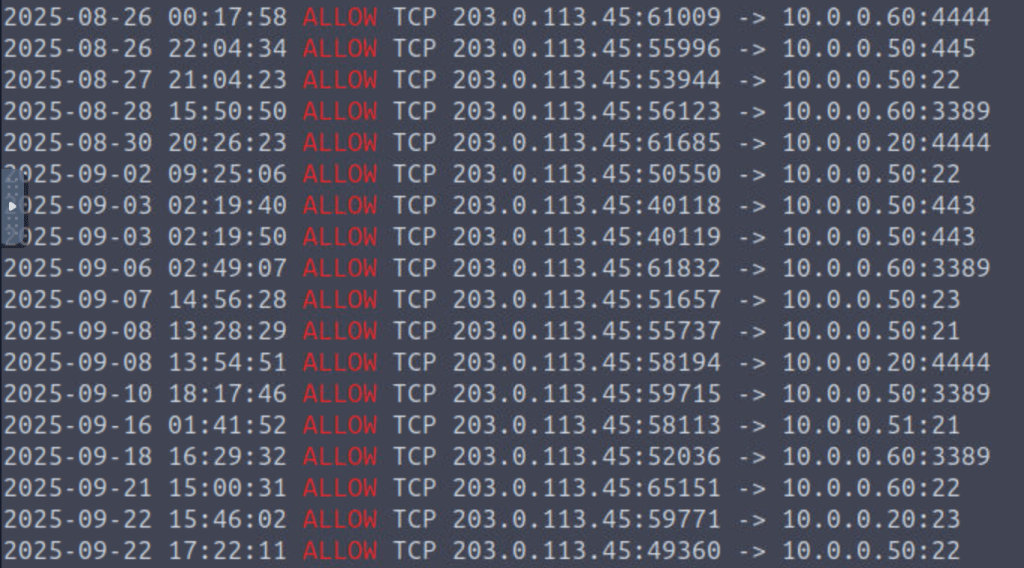
It seems that initial access was gained by the attacker to the internal network.
Now let’s pivot to examining other log files and finding further footprints of the attack
VPN Brute-force / Credential Access
cat vpn_auth.log | grep FAIL | cut -d’ ‘ -f3 | sort -nr | uniq -c
118 203.0.113.45 1 203.0.113.100 1 198.51.100.92 1 198.51.100.45
the suspicious IP has multiple failed VPN login attempts. Let’s now use the following command to narrow down on the suspicious IP, as shown below:
cat vpn_auth.log | grep 203.0.113.45
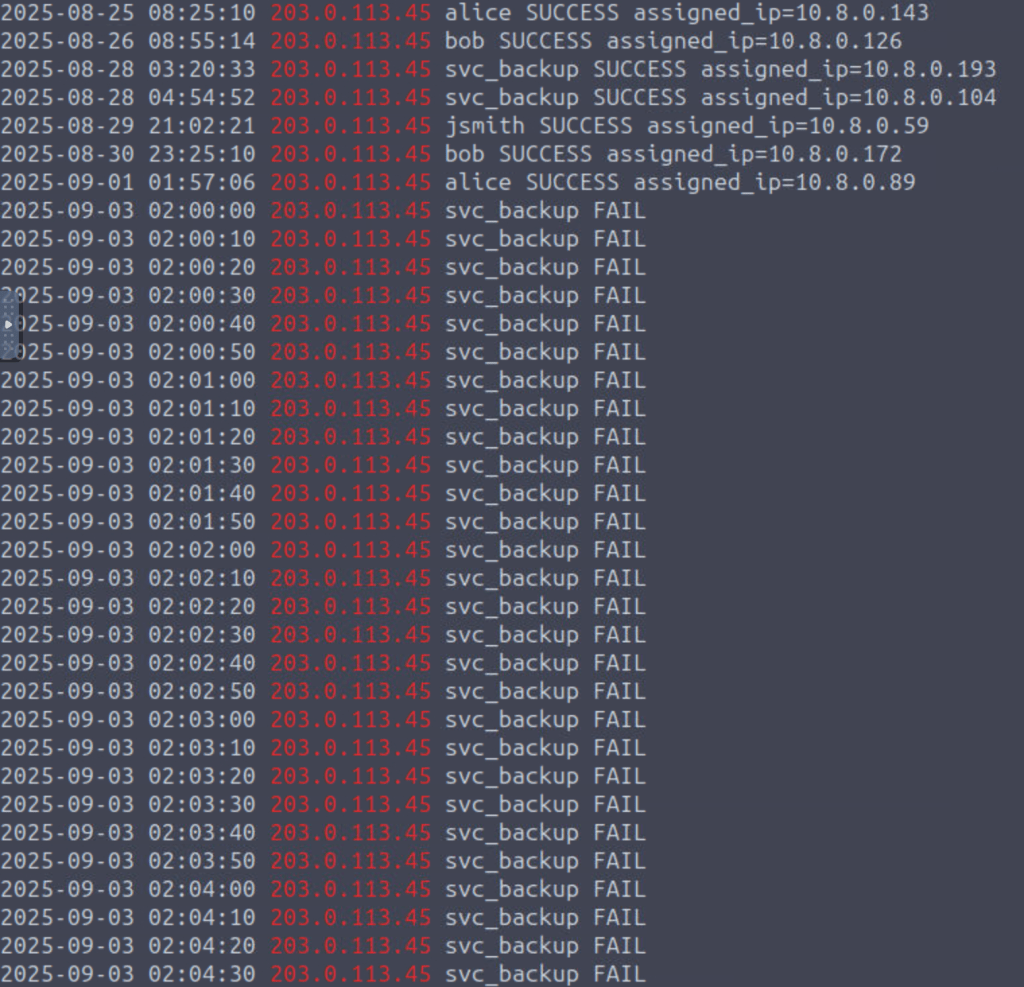
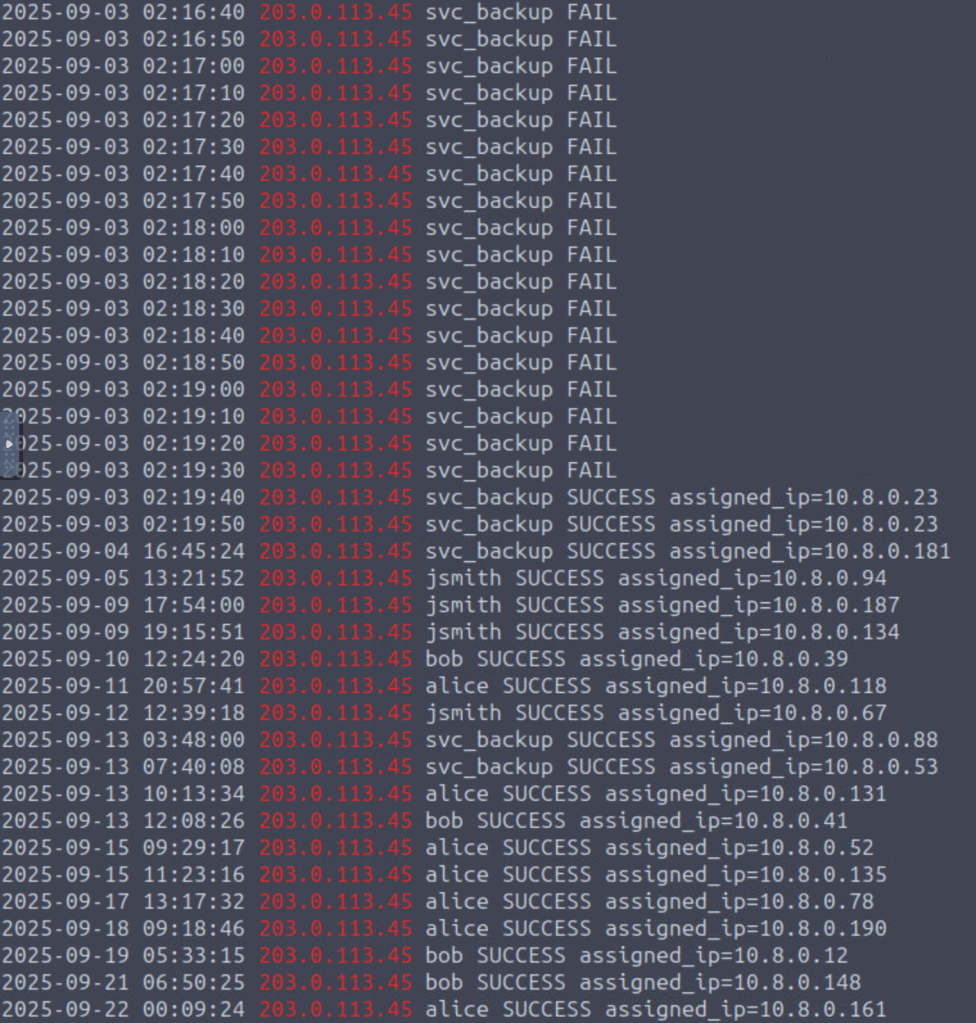
The above output showed that the attacker made multiple login attemp against user “svc_backup”, ending with a successful login, resulting in the attacker being assigned a local IP 10.8.0.23.
Lateral Movement
cat firewall.log | grep 10.8.0.23 | grep “ALLOW” | head
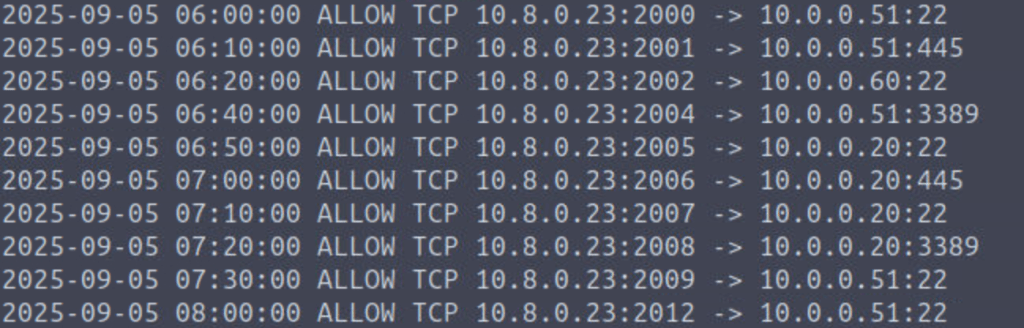
The compromised IP made multiple probing attempts on internal hosts 10.0.0.20, 10.0.0.51, 10.0.0.60 on various ports SMB/RDP/SSH (445/3389/22)
To connect the dots, let’s pivot into the ids_alerts logs, and filter through the compromised IP and see if we can find any intrusion rules triggered, as shown below:
cat ids_alerts.log | grep 10.8.0.23 | head
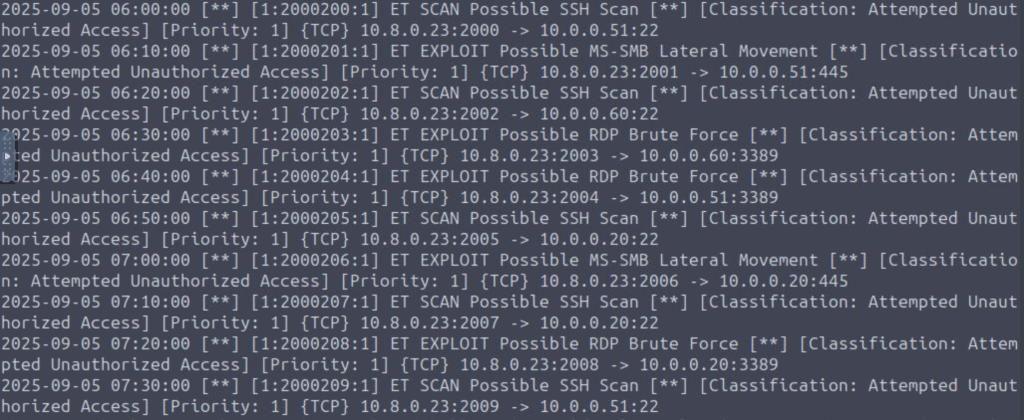
The compormised host seemed to have tried to exploit multiple vulnerabilities, among which SMB exploitation will be further looked into.
cat ids_alerts.log | grep -n 10.8.0.23 | grep ‘SMB’ | cut -d’ ‘ -f6,7,8,9,10,19,21 | head
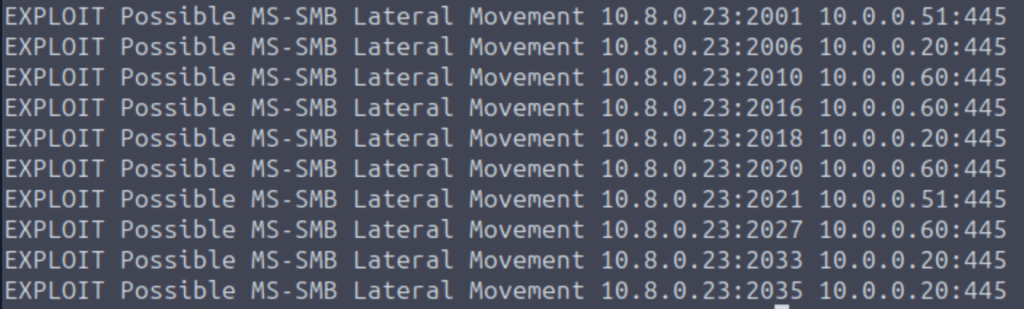
The compromised host was able to exploit the SMB service and achieve lateral movement.
C2 Beaconing
Now that, we have an evidence of the lateral movement of the attacker. Let’s hunt for any indicator of C2 communication. If we look at the IDS alerts, we can find a specific alert related to C2 Beaconing, indicating possible C2 communication.
cat ids_alerts.log | grep C2 | head
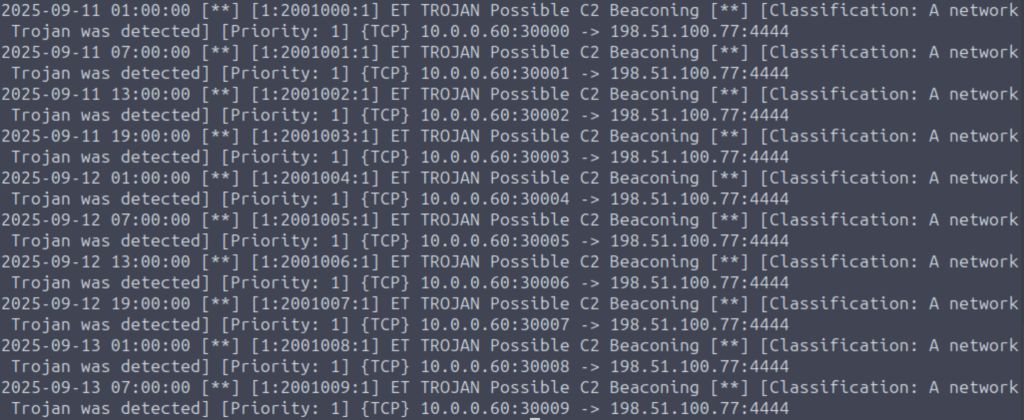
Host identified: 10.0.0.60
To slice and dice through the results and filter against the compromised IP responsible for C2 beaconing:
cat ids_alerts.log | grep -n 10.0.0.60 | cut -d’ ‘ -f6,7,8,9,10,19,22,23 | head -n 15
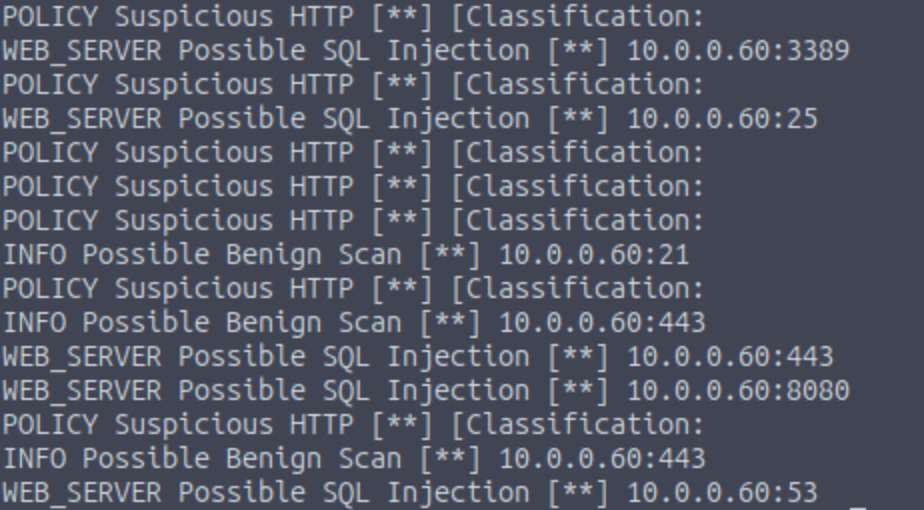
This further affirms that, the infected host is further performing susicious activities.
To see the stats of the alerts triggered agains the infected host:
cat ids_alerts.log | grep -n 10.0.0.60 | cut -d’ ‘ -f6,7,8,9,10,19,22,23 | uniq -c | sort -nr | head
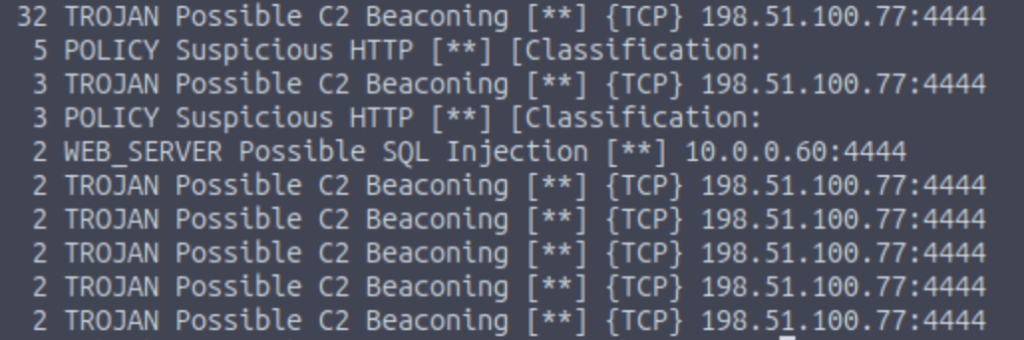
Above analysis clearly indicates that the internal network is fully compromised, and the external IP 198.51.100.77 is acting as a C2 server, recieving the C2 beacons from compromised host.
Data Exfiltration Attempt
Now let’s check if there are any indicators of data being exfiltrated out of the internal network by examining the traffic originating fromthe compromised hosts to an external destination IP, as shown below:
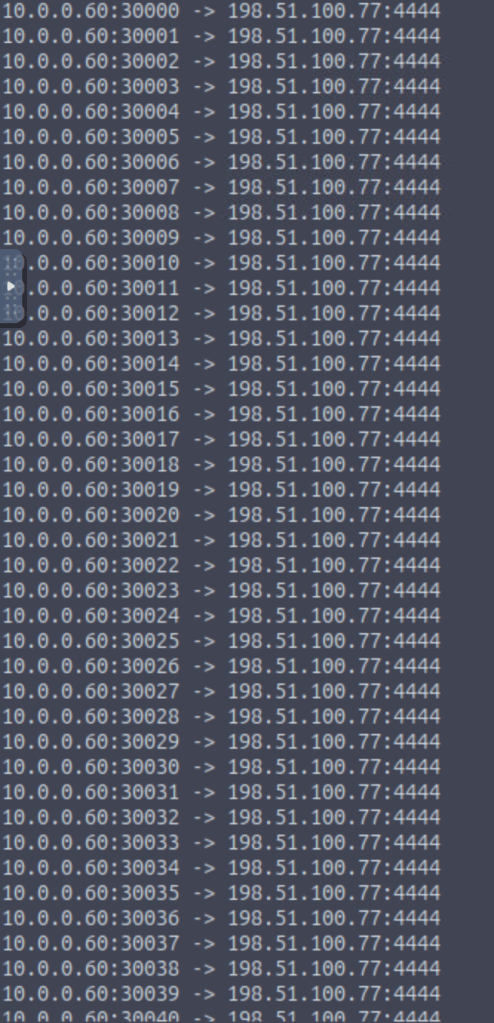
cat firewall.log | grep 10.0.0.60 | cut -d’ ‘ -f5,6,7 | uniq | sort
…
The output clearly shows, the compromised host is sending extensive amound of traffic to external IP address. We can also filter on IDS logs, to see the alerts being triggered on these activities from the internal IP.
 Silly.little.humans.
Leave a comment